


Your scheduled posts are sitting at “Missed schedule”. Backups have not run since last month. The wp_woocommerce_sessions table is climbing and nothing is clearing it. Or Site Health has put up a notice reading A scheduled event has failed and offered nothing further.
Those are all the same problem. WP-Cron has stopped firing, and because nothing in WordPress makes noise about it, it can stay broken for months while every page on the site looks perfectly healthy.
WP-Cron is not cron
The name causes most of the confusion. A real cron daemon runs on a clock: at the appointed second the operating system executes your command, whether or not anybody is looking.
WP-Cron does not do that. It checks the schedule on page load. A request arrives, WordPress looks at the list of due events, and if any are due it fires a loopback HTTP request to wp-cron.php to run them. The plugin handbook puts it plainly: WP-Cron works by checking, on every page load, a list of scheduled tasks.
No visitor, no page load, no cron. That single fact explains most of what goes wrong with it.

Confirm it is actually broken
Three checks, cheapest first.
Site Health. Go to Tools → Site Health → Status. The scheduled events test returns one of four verdicts: Scheduled events are running, A scheduled event is late, A scheduled event has failed, or It was not possible to check your scheduled events. Those are four different problems, not one.
WP-CLI, if you have shell access:
wp cron test
wp cron event list
wp cron test reports on the spawning mechanism itself. wp cron event list shows every registered event with its next run time; an event whose next run is in the past and stays there is your confirmation.
Request the file directly and see what comes back:
curl -sI "https://example.com/wp-cron.php?doing_wp_cron"A 200 means the file is reachable. A 401, a 403 or a redirect to a login screen means your site cannot call itself, which is a different fix entirely.
| What you see | What it usually means |
|---|---|
| Posts stuck at “Missed schedule” | Nothing is spawning WP-Cron at all |
| Backups only run while you are in wp-admin | Traffic is too low; your own visits are the only trigger |
| Site Health: “A scheduled event has failed” | An event threw a fatal error and blocked the rest of the run |
| Events run, but hours late | Working, but starved of page loads |
curl to wp-cron.php returns 401 or 403 | Loopback blocked by auth, a firewall or the host |
DISABLE_WP_CRON is true and there is no crontab entry | Somebody applied half a fix |
The five reasons it stops
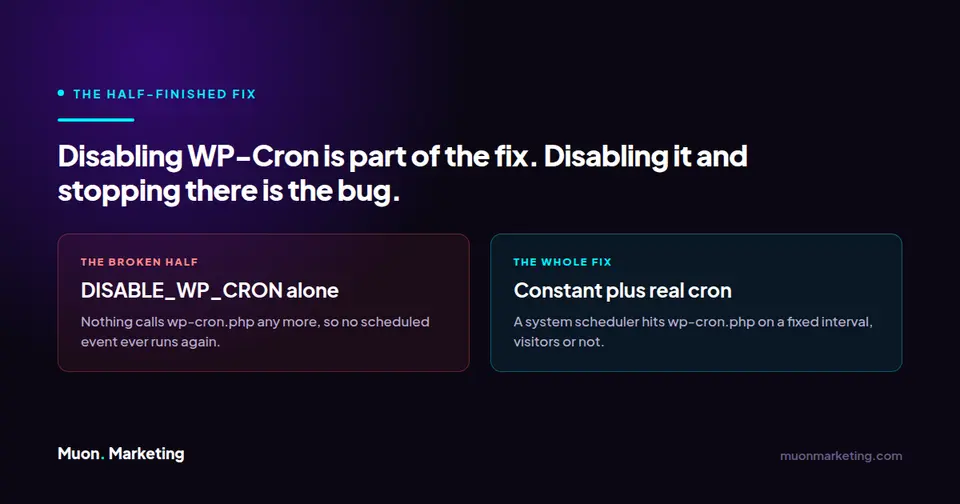
1. DISABLE_WP_CRON was set and nothing replaced it. This is the one we find most often, and it is nearly always well intentioned. A performance guide said to disable WP-Cron, which is sound advice, and the second half of the instruction never got done. On its own the constant is not an optimisation, it is an off switch.
2. Not enough traffic. A brochure site with thirty visits a day has thirty opportunities per day to run its scheduler, clustered in office hours. Anything scheduled hourly simply will not run hourly.
3. Full-page caching sitting in front of PHP. If a CDN or a static-cache plugin serves the response without booting WordPress, the schedule is never checked. The uncomfortable consequence is that your most popular pages become the ones least likely to trigger cron.
4. Loopback requests blocked. WP-Cron works by having your site make an HTTP request to itself. HTTP basic auth on a staging site, a firewall rule, a self-signed certificate or a host that refuses self-directed requests will all break it, and all of them break it silently.
5. One event fataling, or a stuck lock. WordPress holds a lock so two cron runs cannot overlap, governed by WP_CRON_LOCK_TIMEOUT, which core sets to 60 seconds. If an event throws a fatal error part way through a pass, everything queued behind it in that pass does not execute. One misbehaving plugin can stall the entire queue indefinitely.
The fix: drive it from a real scheduler
For any site with real traffic and real scheduled work, stop depending on page loads. In wp-config.php, above the /* That's all, stop editing! */ line:
define( 'DISABLE_WP_CRON', true );Then give the job to the system scheduler. WordPress documents this form:
0 0 * * * wget --delete-after http://YOUR_SITE_URL/wp-cron.phpDaily is the documentation’s illustration, not a recommendation. Most of what WordPress schedules (session cleanup, Action Scheduler queues, backups, update checks) wants to run far more often than once a day. Every five minutes is a sane default:
*/5 * * * * curl -s "https://example.com/wp-cron.php?doing_wp_cron" >/dev/null 2>&1If WP-CLI is available, this version is better still, because it skips HTTP entirely and will surface a fatal error instead of swallowing it:
*/5 * * * * cd /path/to/site && wp cron event run --due-now >/dev/null 2>&1Two things to get right. Check your host first: plenty of managed WordPress hosts already run a system cron against wp-cron.php and set the constant for you, in which case adding your own is duplication rather than a fix. And if loopback requests are the underlying problem and you cannot get them unblocked, define( 'ALTERNATE_WP_CRON', true ); switches to a redirect-based method: the visitor is redirected, returns immediately, and cron continues on the connection they dropped. It works, but it is a workaround with visible effects on your URLs. A real cron job is the better answer whenever you can have one.
What quietly breaks downstream
Almost every “why is this table enormous” problem we investigate traces back to this one. The WooCommerce sessions table grows without limit once its cleanup event stops running. The Action Scheduler actions table is a queue by design, so when nothing drains it, it silently becomes a log. Expired transients are never collected. None of it announces itself; you find out months later when the database is ten times the size it should be, which is why database cleanup that does not first check the scheduler is just deferring the same work.
Checking that scheduled events actually ran is part of every site we look after under managed WordPress care, precisely because nothing else on the site will tell you when they stop.
Frequently asked questions
How do I know if my host already runs a real cron job for WordPress?
Check wp-config.php for DISABLE_WP_CRON. If it is set to true and your scheduled events are running on time, something external is already calling wp-cron.php and you should leave it alone. If it is set to true and events are not running, that is your problem. When in doubt, ask the host directly, because adding a second scheduler on top of theirs causes overlapping runs rather than faster ones.
Is disabling WP-Cron bad for SEO?
Not directly, and done properly it helps. Setting DISABLE_WP_CRON and replacing it with a real cron job removes a loopback request from page loads, which slightly improves response times. What does hurt is setting the constant and adding nothing, because scheduled publishing, sitemap regeneration and index-status pings all stop.
How often should the cron job run?
Every five minutes suits almost every site. WordPress documentation illustrates the setup with a daily job, but that is only an example. Session cleanup, Action Scheduler queues and update checks all expect to run more frequently than once a day. Going below one minute is rarely useful and risks overlapping runs.
Why do my scheduled posts say “Missed schedule” when other events run fine?
Usually because the post was due during a quiet stretch with no page loads, and WordPress does not retry a publication once its window has passed. It can also happen when a cron run starts, hits the WP_CRON_LOCK_TIMEOUT lock, and the publication event never gets its turn. Moving to a real cron job on a five-minute interval fixes both.
Does a caching plugin stop WP-Cron from working?
It can. If the cache serves a page without loading WordPress, that request never checks the schedule. Most caching plugins exclude wp-cron.php itself and do not break scheduling outright, but a full-page cache or a CDN in front of the site meaningfully reduces how many requests reach PHP, which is exactly what WP-Cron depends on. This is the case where moving to a system cron job matters most.
What is ALTERNATE_WP_CRON and should I use it?
It is a fallback for sites whose loopback requests are blocked. Instead of the site calling itself, the visitor gets a redirect, returns immediately, and cron runs on the connection they just dropped. It works, but it appends a query string to URLs and can interact badly with caching. Treat it as a workaround while you get loopback requests fixed, not as the destination.