
If you have been looking through your WordPress database and found a table called wp_wfHits taking up more space than everything else combined, you are not looking at a bug. You are looking at your security log doing exactly what it was told to do.
What Is the wp_wfHits Table?
wp_wfHits is created by the Wordfence Security plugin. It stores the records behind the Live Traffic feed, the page in Wordfence that shows what is hitting your site right now.
One detail explains most of its size. Wordfence logs traffic at the server level, not with JavaScript. That means it captures search engine crawlers, hack attempts, and every other request that never runs a script in a browser. Google Analytics never shows you those visits. Wordfence records all of them, and each one becomes a row in wp_wfHits.
You will see the name written both ways. Wordfence creates the table in camel case as wp_wfHits, but most people type it as wp_wfhits when they search. On Linux servers MySQL table names are case sensitive, so use the camel case form in any query you run.

Why wp_wfHits Grows So Fast
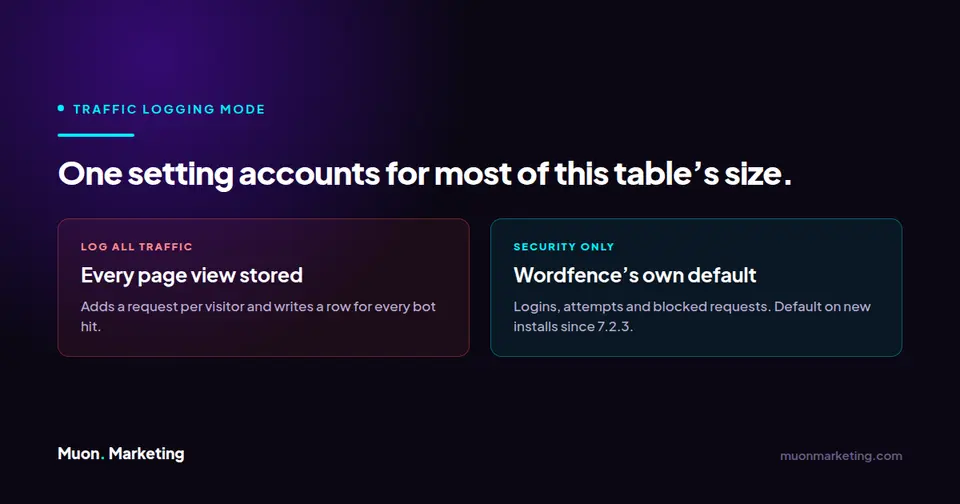
The single biggest factor is the Traffic logging mode setting. Wordfence lets you log all traffic or only security related traffic, and its own Live Traffic documentation recommends the security only option. That has been the default on new installations since Wordfence 7.2.3.
If your site is set to log all traffic, every crawler request, every bot probe, and every ordinary page view is written to the database. Wordfence also notes that logging all traffic adds an additional request for each visitor, so the cost is not only storage. On a site that gets crawled heavily, this is how a security table quietly becomes the largest object in your database.
How to Shrink wp_wfHits Safely
All of these live under Wordfence, then Tools, then Live Traffic, in the Options panel. None of them require touching the database directly.
- Set Traffic logging mode to security related traffic only. This is the change that actually stops the growth.
- Lower Amount of Live Traffic data to store (number of rows). This caps how much database space Live Traffic is allowed to occupy.
- Lower Maximum days to keep Live Traffic data. The default is 30 days and the minimum is 1 day. Wordfence cannot store more than 30 days regardless of what you set.
- Enable Do not log signed in users with publishing access so your own admins and editors stop filling the log.
- Use Browser user agent to ignore to exclude uptime monitors and external scanners that hit the site on a schedule.
Two things are worth knowing about the timing. Wordfence checks these limits once a day and removes the records over the limit at that point, so the table shrinks on its own schedule rather than the moment you hit save. And if your Live Traffic page shows the message Security related traffic only (host setting), your host or a developer already set that for database performance. Wordfence advises that this generally should not be changed.
| Live Traffic option | Default | Set this when the table is large |
|---|---|---|
| Traffic logging mode | Security-related only on installs since Wordfence 7.2.3 | Security-related traffic only. This is the setting that stops the growth. |
| Amount of Live Traffic data to store (number of rows) | Varies by install | Lower it. This caps the database space Live Traffic may occupy. |
| Maximum days to keep Live Traffic data | 30 days | Lower it. Minimum is 1 day and 30 is the hard ceiling. |
| Do not log signed in users with publishing access | Enabled | Keep enabled so your own admins and editors stay out of the log. |
| Browser user agent to ignore | Empty | Add uptime monitors and external scanners that hit the site on a schedule. |
Should You Empty wp_wfHits Manually?
Truncating wp_wfHits costs you your Live Traffic history. It does not break your site and it does not remove any protection, because the table is a log rather than a configuration store. Wordfence keeps its settings elsewhere.
That said, manual truncation treats the symptom. If Traffic logging mode is still set to log everything, the table will be back to the same size in a matter of weeks. Change the setting first, then clear the table if you still need the space back immediately.
Wordfence supports removing its data through the plugin itself, either with the option to remove all Wordfence data when the plugin is disabled, or with the separate Wordfence Assistant plugin. Whichever route you take, take a database backup before you start.
If you are seeing a locked or unresponsive table rather than just a large one, that is a hosting level problem and not a settings problem. Your host will need to look at it.
Not sure which table is your problem? Start with how to find the one table slowing your WordPress database, which covers all of them and the question to ask before deleting anything.
Related Wordfence Tables
wp_wfHits is rarely the only Wordfence table worth a look. If you are auditing database size, the file change log is the other common culprit. We covered it separately in what wffilemods is in your WordPress database and whether you can empty it. The scan buffer is worth the same check: why a large wp_wfHoover table means a Wordfence scan never finished. If Yoast is also installed, the wp_yoast_indexable table is worth a look too, though the advice there is different because it is a cache rather than a log. Running WooCommerce? the wp_actionscheduler_actions table is usually larger than any of them.
wp_wfHits FAQs
What is the wp_wfHits table in WordPress?
It is the database table the Wordfence Security plugin uses to store Live Traffic records. Every request Wordfence logs at the server level becomes a row, including crawlers and blocked attempts that never appear in Google Analytics.
Is it safe to empty the wp_wfHits table?
Yes. The table is a log, not a configuration store, so clearing it removes your Live Traffic history but does not disable any protection or break the site. Back up your database first, and change the Traffic logging mode setting or the table will simply refill.
Why is my wp_wfHits table so large?
Almost always because Traffic logging mode is set to log all traffic instead of security related traffic only. In that mode every bot request and ordinary page view is written to the database. Wordfence recommends the security only setting and has made it the default on new installations since version 7.2.3.
How long does Wordfence keep Live Traffic data?
The Maximum days to keep Live Traffic data option defaults to 30 days, with a minimum of 1 day. Wordfence cannot retain Live Traffic data for more than 30 days. Limits are checked once daily and older records are removed at that point.
Is wp_wfHits the same as wp_wfFileMods?
No. wp_wfHits stores the Live Traffic request log, while wp_wfFileMods stores the record of file changes Wordfence detects during scans. Both can grow large, but they are controlled by different settings.
Will disabling Live Traffic make my site less secure?
No. Switching to security related traffic only still logs successful logins, login attempts and blocked requests. You lose visibility into ordinary page views, not any firewall or scanning protection.
Need someone to handle this kind of thing for you? We handle this as part of a maintenance plan, and it is part of what we cover under managed WordPress care, and you can talk to us about your site, including the database maintenance that never makes it onto anyone list of priorities until the site slows down.