
A fake RFQ is a phishing email dressed up as a quote request. It asks whether you have capacity for a job, promises drawings or a part print to follow, and then sends a link that wants you to sign in before you can see them. If a buyer needs your email password before you can read a print, it is not a buyer.
These emails are aimed at shops, contractors and suppliers because answering quote requests is the job. Below are the five signs that give one away, a two-minute check you can run before you reply, and what to do if someone on your team already clicked.
What does a fake RFQ email look like?
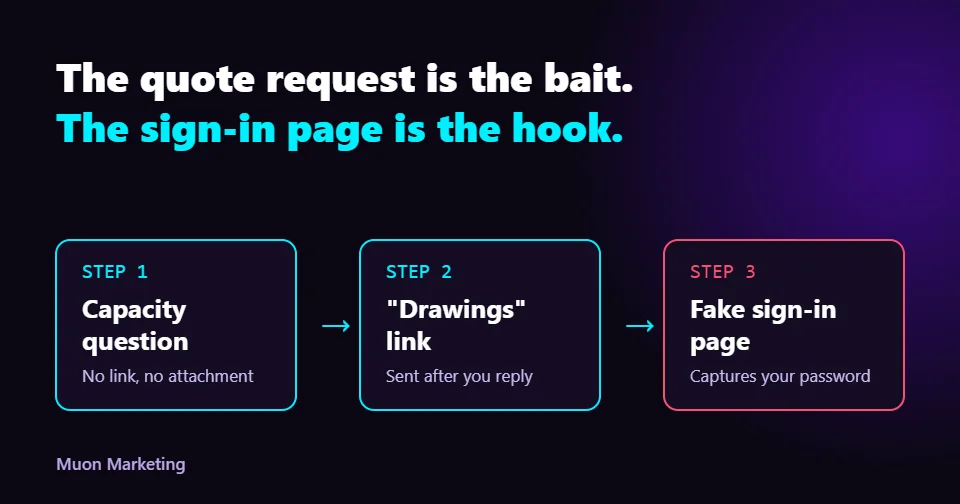
A fake RFQ usually arrives in two steps. The first email is short and harmless on purpose: no link, no attachment, nothing for a spam filter to catch. Something like, “Do you have capacity for a progressive die? I’ll send the part print over once you confirm.” It is signed with a real-sounding name and a real company.
You reply, because that is what you do with a lead. The second email carries the hook: a link to “project drawings,” an “RFQ package” or a secure file share. The page it opens looks like a Microsoft 365 or Google sign-in screen, and whatever you type goes to the sender.
This is not a rare trick. Fortra researchers reported that malicious emails mentioning RFQs rose twelvefold between October 2025 and September 2026, and that nearly 73% of the RFQ lures they studied led to a page built to steal login details.
A second version is after goods rather than passwords. The FBI’s Internet Crime Complaint Center describes criminals posing as real companies to open Net 30 or Net 60 accounts with fake credit references, place large orders and never pay.
5 signs a quote request is phishing
1. The sender’s domain does not match the company in the signature. A buyer from an instrument maker writing from a trucking company’s domain, a free webmail account, or a lookalike such as an extra word or a swapped letter in the company name. Check the Reply-To address as well, because it can differ from the From line.
2. There are no specifics. Real RFQs carry a part number, material, quantity, tolerances or a due date. Fake ones talk about an “ongoing project” and ask you to “confirm availability” without saying what the project is.
3. The drawings sit behind a sign-in page. A real buyer attaches a PDF or STEP file, or uses a supplier portal you already have an account on. A link that asks for your email password before a document opens is the attack itself.
4. Credit terms or rush shipping come up before anyone has talked. Proofpoint found that these scammers often hold back the ship-to address until credit is approved, then send goods to a freight forwarder, a residence or a short-term rented warehouse.
5. The buyer will not get on the phone. The GSA Office of Inspector General lists procurement contacts who refuse to talk by phone as a warning sign in fake government quote requests. The same holds for private ones.
| What you see | A real RFQ | A fake RFQ |
|---|---|---|
| Sender address | The company’s own domain | Webmail, an unrelated domain or a lookalike |
| Job details | Part number, material, quantity, due date | “Ongoing project,” “confirm availability” |
| Drawings | Attached, or in a portal you already use | A link that asks you to sign in first |
| Payment terms | Discussed after a conversation | Net 30 requested up front, often with rush shipping |
| Ship-to address | The buyer’s plant or a known job site | Withheld, or a freight forwarder, residence or storage unit |
| Phone | Happy to talk | Avoids calls, sticks to email |
How do you check a buyer before you reply?
Checking a buyer takes about two minutes, and you can do it before you send a single word back.
1. Open the full sender address, not just the display name. On a phone this usually means tapping the name. The FBI recommends turning on full address display so the real domain is always visible.
2. Type the company’s website into your browser yourself and compare its domain to the one in the email.
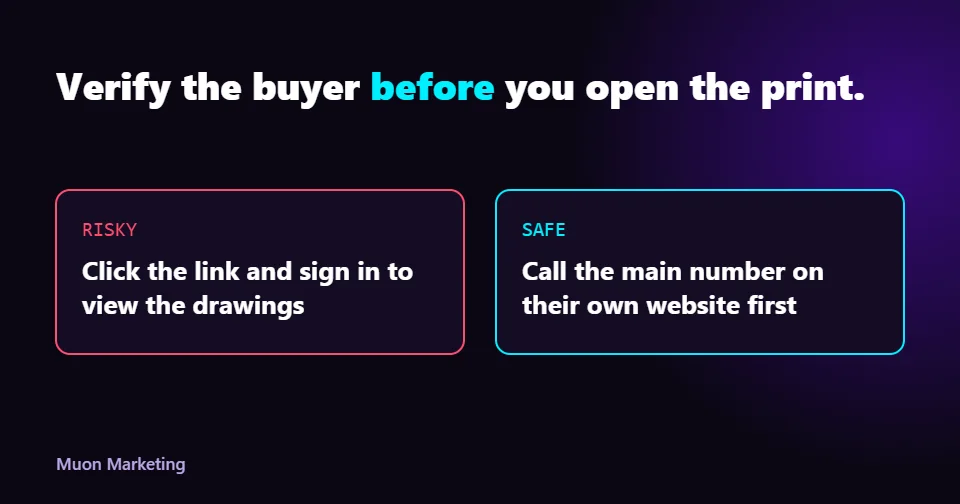
3. Call the main number listed on that website, not the number in the signature, and ask for the buyer by name.
4. If they send a ship-to address, search it. A storage facility or freight forwarder is a reason to stop.
5. Ask for the print as an attachment. A real buyer will send it. A phisher will push the link again.
If the company is real and has never heard of the person, tell them. Their name is being used, and their own customers may be getting the same email.
What if someone already clicked the link?
If anyone entered a password on one of these pages, treat that mailbox as taken over. Fortra notes that these pages can capture multi-factor codes or session tokens, so a new password on its own may not lock the attacker out.
1. Change the password from a trusted device, by typing the sign-in address yourself.
2. Have whoever runs your email sign the account out of every session and check its sign-in history.
3. Look for mail forwarding or inbox rules nobody on your team created.
4. Warn coworkers and customers. A taken-over mailbox is used to phish the people who trust it and to send fake payment instructions.
5. If money has moved, call your bank straight away and ask for a recall, then file a report with the FBI’s IC3.
The IC3 business email compromise page lists what to include in a report, and speed matters more than completeness when a payment is involved.
Should you delete it or report it?
Report it, then delete it. Mark it as phishing in your email program so the filter learns, and send it to whoever handles your IT. If it impersonates a real company, tell that company. If it pretends to be a government agency, report it to the FBI’s IC3 and to that agency’s Inspector General.
Keep the original email until the report is filed. The sender domain and the link are the useful parts, and deleting the message first throws them away.
Related reading
Fake quote requests are one of several ways small businesses get targeted through the mail. The official-looking renewal notice is another, and we break one down in what a Domain Name Services letter really is. Account access is the other half of the problem: how to give someone access to your Google Business Profile covers sharing a login safely instead of handing over a password. For the routine checks that catch problems early, see our website maintenance checklist.
Fake RFQ FAQs
What is RFQ phishing?
Why do scammers send fake quote requests to manufacturers and contractors?
Is it safe to reply to a suspicious quote request?
Can a fake RFQ get past multi-factor authentication?
How do I report a fake RFQ email?
What is a Net 30 RFQ scam?
Not sure whether an email is real? Muon’s IT support for small businesses gives you a named person to email when something about your website, domain or Google account looks off, or you can book a call and talk it through.